Black Friday sale: 30% off Flywrite
Flywrite for newsletter writers

Write every issue
with your agent

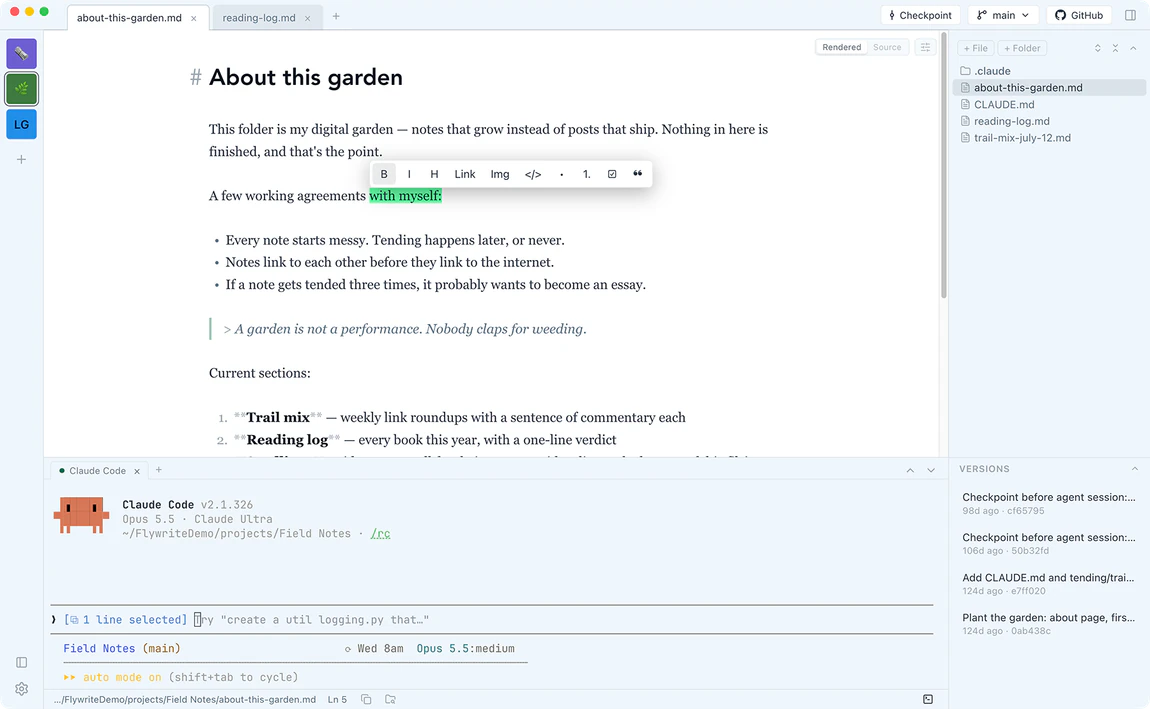
Flywrite is the Markdown writing app for writing your newsletter with AI on a Mac. Draft each issue as a plain file, and run Claude Code, Codex or any CLI agent on it in a real terminal under the page. No AI fee.

Mac appBring your own agent
Your agent helps with every issue. Your writing setup doesn't.

You send an issue on a schedule. It starts as notes and links, turns into a draft, and needs a last pass before it goes out. An agent such as Claude Code or Codex can help with the outline, the tightening and the checks.

But the agent runs in a code editor or a chat window, not where you write, so every pass means switching apps or pasting text back and forth.

The draft lives in a code editor

That's where the agent runs, so you read your own issue in a tool built for code.

Every pass is copy and paste

You paste the issue into a chat window, paste the answer back, then fix the formatting.

An agent edit you can't take back

It tightened the intro and touched last week's issue too, and there's no easy way to get it back.

Your issue, from notes to send, in Flywrite.

  1. Step 1: Keep issues in one folder

    Put each issue in its own Markdown file, such as 2026-11-12-issue.md, and open the folder. Past issues sit beside the one you're writing.

  2. Step 2: Draft on a page that reads like the inbox

    Write in Rendered view, where the issue reads the way it will when it's sent. Press ⌘E for Source view and the raw Markdown.

  3. Step 3: Ask your agent for a pass

    Select a paragraph and ask Claude Code, Codex or another CLI agent to tighten it, or ask it to check every link. The editor updates live as it edits.

Everything you need to write each issue with your agent.

A page that reads like the inbox

Draft each issue in Rendered view, where it reads the way your subscribers will see it, with Source view one keystroke away (⌘E). Pick the theme, fonts, text size and page width for your newsletter project.

Your own agent, on your issues

Launchers start Claude Code, Codex and Cursor Agent, and any other agent that runs in the Mac terminal runs here too, on the plan, skills and memory you already have. Ask it to outline, tighten or check an issue.

The terminal knows which issue you're in

Claude Code gets the open issue, the line and your selection with no setup, and Cursor Agent does after its one-time setup, so "tighten this paragraph" works on the paragraph you've selected. Send Selection to Terminal (⌘⇧L) works for any agent.

Roll back what the agent changed

Flywrite saves a checkpoint of the whole project when Claude Code starts in its terminal, and when Cursor Agent starts after its one-time setup. Codex and other CLI agents don't trigger it, so press ⌘⇧C before you start them. Restore the whole project or just this week's issue.

Your archive, backed up to GitHub

One Sync button backs up your folder of issues to your own GitHub repository and keeps your Macs in step, so your archive lives off your Mac too. You never write a git command.

Every issue is a plain file

Each issue is an ordinary Markdown file in a folder you choose. Past issues sit beside the one you're writing, and your agent reads them like any other file.

“I write a LOT of markdown but clunky IDE previews just made me miserable. Flywrite does everything I want: keyboard friendly, customizable, git backed. Perfect!”
David K.
“My favorite writing app, by far! I love how I can customize it exactly how I want.”
Cindy T.
“Finally, a view and edit flow right in a great-looking package that's a pleasure to work with!”
Jeff R.

One plan. Every feature.
Bring your own agent.

Black Friday: 30% off
$99per year

30% off at checkout with the Black Friday sale.

  • Flywrite for Mac: the full app, every feature
  • A real terminal under the page for Claude Code, Codex or any CLI agent
  • Checkpoints to roll back what the agent changed, and GitHub backup
  • All updates and new features for a year
  • Support from the maker of Flywrite
Buy Now

Instant download for Mac.

Questions from newsletter writers

Does Flywrite send my newsletter?

No. Flywrite is where you write each issue. Copy the finished issue into your newsletter platform, or paste the Markdown if the platform accepts it.

Which agent should I use on my issues?

Any CLI agent that runs in the Mac terminal runs in Flywrite, with launchers for Claude Code, Codex and Cursor Agent. Claude Code sees the open issue, the line and your selection with no setup. For the full steps, read Use Claude Code on your newsletter drafts.

Will the agent change my past issues?

It can edit any file in the project folder. Flywrite saves a checkpoint of the whole project when Claude Code starts in its terminal, and when Cursor Agent starts after its one-time setup. Codex and other CLI agents don't trigger it, so press ⌘⇧C before you start them. Restore the whole project or one file. Review and undo agent edits.

Can I keep my whole archive in Flywrite?

Yes. Keep every issue as a Markdown file in one folder and open it as a project. When you click Sync, Flywrite backs the folder up to your own GitHub repository. Back up Markdown to GitHub.

What does Flywrite cost a newsletter writer?

Flywrite is $99 a year per seat for Mac, with every feature, on up to 3 devices. There's no AI fee; your agent runs on the plan you already have.

When is my newsletter platform's editor the better fit?

If you write inside your platform's editor and don't run an agent on your drafts, its own drafts and history are simpler. Flywrite works on files on your Mac, and it doesn't run on Windows or a phone.

Why I built Flywrite

Hi, I'm Brian. I make my living writing: newsletters, YouTube scripts, courses. And these days, Claude Code is my collaborator on nearly all of it.

But I never liked creating in a code editor. Cursor and VS Code are built for shipping software. Prose deserves better than a clunky preview pane in a dev tool.

So I built the writing experience I actually wanted: calm and paper-like where I write, a real terminal right below it where my agent assists, and checkpoints to roll back what the agent changed, backed up to GitHub the way I'm used to. I hope you love writing in Flywrite as much as I do.

Brian CaselBrian CaselCreator of Flywrite@casjam

Write your next issue in Flywrite.

Buy Flywrite for Mac